Quick answer
Creating your first dashboard involves planning your data story, connecting data sources, selecting appropriate visualizations, designing an intuitive layout, and sharing insights. Start with a clear objective, choose relevant metrics, and use simple charts to communicate key findings effectively.
Creating your first dashboard involves planning your data story, connecting data sources, selecting appropriate visualizations, designing an intuitive layout, and sharing insights. Start with a clear objective, choose relevant metrics, and use simple charts to communicate key findings effectively.
Building your first business dashboard can seem daunting, but following a structured approach makes the process manageable and rewarding. Whether you're using business intelligence platforms, spreadsheet tools, or specialized dashboard software, the fundamental principles remain the same: start simple, focus on your audience, and tell a clear data story.
How to Create Your First Dashboard
Creating your first dashboard is an exciting milestone in your data journey. By following a systematic approach, you'll transform raw data into meaningful insights that drive better decision-making. This guide walks through the essential steps, from initial planning to final publication.
Step 1: Define Your Dashboard Purpose and Audience
Before touching any data or tools, clarify what you want to achieve:
Identify the Business Question: What specific question does your dashboard need to answer? Examples:
- "How is our sales performance trending this quarter?"
- "Which products are underperforming?"
- "What are our key customer satisfaction drivers?"
Understand Your Audience: Who will use this dashboard?
- Executive Leadership: Focus on high-level KPIs and strategic metrics (see executive dashboards)
- Department Managers: Include operational details and team-specific metrics
- Individual Contributors: Provide actionable insights for daily tasks
- External Stakeholders: Emphasize clear, self-explanatory visualizations
Determine Key Metrics: List 5-7 critical metrics that directly answer your business question. Avoid metric overload that can confuse users.
Step 2: Gather and Prepare Your Data
Data preparation is the foundation of effective dashboards:
Identify Data Sources: Where does your data live?
- Databases: SQL databases, data warehouses, or data lakes
- Spreadsheets: Excel files, Google Sheets, or CSV exports
- APIs: Real-time data from business applications
- Cloud Services: AWS, Google Cloud, or Azure data services
Connect to Data: Establish reliable data connections:
- Direct Connections: Connect directly to databases using credentials
- Data Imports: Upload spreadsheets or CSV files
- API Integrations: Set up automated data refresh from APIs
- Data Warehouses: Connect to centralized data repositories
Clean and Transform Data: Prepare data for visualization:
- Remove Duplicates: Eliminate redundant records
- Handle Missing Values: Fill gaps or exclude incomplete records
- Standardize Formats: Ensure consistent date formats, units, and categories
- Create Calculated Fields: Add computed metrics like percentages or growth rates
Step 3: Choose Your Dashboard Platform
Select tools based on your needs and technical comfort:
Business Intelligence Platforms:
- FireAI: Our own platform with AI-powered analytics and dashboards
- Tableau: Powerful drag-and-drop interface with advanced analytics
- Power BI: Microsoft's user-friendly platform with strong Excel integration
- Looker: Modern platform with integrated data modeling
- Qlik Sense: Self-service analytics with associative data exploration
FireAI: Our own platform with AI-powered analytics and dashboards.
- AI-powered analytics: Ask questions in natural language and get instant visual answers
- Voice queries: Speak your questions in 12 Indian languages via Bhashini
- 18 chart types: From simple bar charts to advanced Sankey diagrams, heatmaps, and waterfalls
- Causal chain analysis: Understand why metrics change, not just what happened
Spreadsheet-Based Solutions:
- Google Data Studio: Free tool that connects to Google services
- Excel Dashboards: Familiar interface for Excel users
- Google Sheets: Simple dashboards with basic visualization capabilities
Specialized Dashboard Tools:
- Klipfolio: Cloud-based platform with extensive integrations
- Geckoboard: Real-time dashboard platform with mobile support
- Databox: Business dashboard platform with customizable widgets
- FireAI: Our own platform with AI-powered analytics and dashboards
Considerations for Selection:
- Ease of Use: Choose platforms with intuitive interfaces for beginners
- Data Source Compatibility: Ensure your data sources are supported
- Sharing Capabilities: Check collaboration and sharing features
- Cost: Evaluate free tiers, subscriptions, and enterprise pricing
- Scalability: Consider future needs for more complex dashboards
Step 4: Design Your Dashboard Layout
Create an intuitive and visually appealing dashboard:
Plan the Layout: Organize content logically:
- Top Section: Key performance indicators and summary metrics
- Middle Section: Trend charts and detailed visualizations
- Bottom Section: Supporting data tables and reference information
- Right Sidebar: Filters and controls for user interaction
Apply Design Principles:
- Visual Hierarchy: Use size, color, and position to guide attention
- Consistent Styling: Maintain uniform colors, fonts, and formatting
- White Space: Provide breathing room between dashboard elements
- Mobile Responsiveness: Ensure usability on tablets and phones
Choose Color Schemes:
- Status Colors: Green for good, yellow for caution, red for concerning
- Brand Colors: Incorporate organizational colors where appropriate
- Accessibility: Ensure sufficient contrast for all users
- Color Blind Friendly: Use patterns and shapes in addition to colors
Step 5: Create Visualizations
Select and build appropriate charts for your data:
Common Chart Types:
- Bar Charts: Compare values across categories
- Line Charts: Show trends over time
- Pie Charts: Display proportions of a whole
- Scatter Plots: Reveal relationships between variables
- KPI Cards: Highlight important metrics prominently
Build Your First Charts:
- Start with a KPI Card: Display your most important metric
- Add a Trend Chart: Show how the metric changes over time
- Include Comparisons: Add charts comparing different categories or time periods
- Add Context: Include benchmarks, targets, or industry averages
Visualization Best Practices:
- Keep it Simple: Use clear, uncluttered designs
- Label Everything: Ensure axes, legends, and data points are labeled
- Use Appropriate Scales: Avoid misleading truncated axes
- Provide Context: Include reference lines for targets and benchmarks
Step 6: Add Interactivity
Make your dashboard engaging and useful:
Implement Filters: Allow users to explore data dynamically:
- Date Range Filters: Focus on specific time periods
- Category Filters: View data for specific products, regions, or segments
- Value Filters: Show only data meeting certain criteria
Add Drill-Down Capabilities: Enable deeper exploration:
- Hierarchical Navigation: Click to see more detailed breakdowns
- Detailed Views: Expand summary data into granular information
- Related Insights: Show connected metrics and trends
Interactive Elements:
- Hover Details: Show additional information on mouse interaction
- Clickable Charts: Navigate to related dashboards or reports
- Dynamic Updates: Refresh data automatically or on demand
Step 7: Test and Refine
Ensure your dashboard meets user needs:
User Testing: Get feedback from intended users:
- Usability Testing: Observe how users interact with the dashboard
- Feedback Sessions: Gather input on clarity and usefulness
- A/B Testing: Test different designs or layouts
Performance Testing: Ensure technical reliability:
- Load Testing: Check performance with expected user volumes
- Data Refresh Testing: Verify automated data updates work correctly
- Mobile Testing: Confirm usability on different devices
Iterative Refinement: Make improvements based on feedback:
- Simplify Complex Areas: Reduce cognitive load where needed
- Add Missing Elements: Include requested features or data
- Fix Usability Issues: Address navigation or interaction problems
- Optimize Performance: Improve loading times and responsiveness
Step 8: Publish and Share
Make your dashboard available to users:
Set Up Sharing: Configure appropriate access levels:
- Internal Sharing: Share with team members or departments
- External Sharing: Provide access to clients or partners
- Public Sharing: Make dashboards available on websites or portals
Schedule Updates: Ensure data stays current:
- Automated Refresh: Set up regular data updates
- Real-Time Updates: Enable live data for time-sensitive metrics
- Manual Triggers: Allow on-demand data refreshes
Create Documentation: Support user adoption:
- User Guides: Provide instructions for dashboard usage
- Data Dictionaries: Explain metrics and calculations
- Training Materials: Create videos or tutorials for complex features
Step 9: Monitor Usage and Maintain
Keep your dashboard valuable over time:
Track Usage Metrics: Understand how your dashboard is used:
- View Counts: Monitor dashboard access frequency
- Interaction Data: Track which elements users engage with most
- User Feedback: Collect ongoing input for improvements
Regular Maintenance: Keep the dashboard current and relevant:
- Data Quality Checks: Ensure data accuracy and completeness
- Content Updates: Refresh metrics and add new insights
- User Feedback Integration: Incorporate suggestions and requests
- Platform Updates: Take advantage of new features and improvements
Common Challenges and Solutions
Challenge: Data Complexity
Problem: Raw data is messy and difficult to work with.
Solution:
- Start with clean, well-structured data sources
- Use data preparation tools to clean and transform data
- Work with IT or data teams to access properly prepared data
- Begin with simple datasets and gradually increase complexity
Challenge: Tool Selection Overwhelm
Problem: Too many dashboard tools make selection difficult.
Solution:
- Start with familiar tools (Excel, Google Sheets) for your first dashboard
- Evaluate 2-3 platforms based on your specific needs
- Consider free trials or demos before committing
- Focus on ease of use for beginners rather than advanced features
Challenge: Design Uncertainty
Problem: Not knowing how to create an effective dashboard layout.
Solution:
- Study examples of effective dashboards in your industry
- Use platform templates as starting points
- Follow basic design principles (hierarchy, consistency, simplicity)
- Get feedback early and iterate based on user input
Challenge: Stakeholder Alignment
Problem: Different users have conflicting requirements.
Solution:
- Focus on the primary audience and their most important needs
- Create different views or versions for different user groups
- Prioritize requirements based on business impact
- Use iterative development to incorporate feedback gradually
Tools and Resources for Beginners
Free and Easy Starting Points
Google Data Studio: Free tool with intuitive interface
Microsoft Power BI Free: Desktop version for learning
Tableau Public: Free version with community examples
Excel Dashboards: Use familiar spreadsheet tools
Learning Resources
Online Tutorials: YouTube channels and platform documentation
Udemy/Coursera Courses: Structured learning paths for dashboard creation
Platform Communities: Forums and user groups for specific tools
Books and Guides: "Dashboard Design" and "Information Dashboard Design"
Template Resources
Platform Templates: Built-in examples from dashboard tools
Industry Examples: Sample dashboards for your business sector
Design Inspiration: Gallery sites showcasing effective dashboards
Customization Guides: Step-by-step tutorials for common modifications
Advanced Tips for Your First Dashboard
Start Small, Think Big
Begin with a focused dashboard addressing one key business question, but design with future expansion in mind.
Focus on Impact
Choose metrics that directly influence business decisions and can demonstrate clear value from your dashboard.
Prioritize User Experience
Design for how people actually work, not just how data is structured.
Plan for Scale
Consider how your dashboard will grow as you add more users, data sources, and complexity.
Embrace Iteration
Your first dashboard won't be perfect—plan to learn from user feedback and continuously improve.
Creating your first dashboard is an important step in your data journey. By following this structured approach, you'll create a valuable tool that transforms data into actionable insights. Remember that dashboard creation is an iterative process—start simple, learn from your users, and continuously refine your approach.
As you gain experience, you'll discover that effective dashboards are as much about understanding your audience and telling a clear data story as they are about technical implementation. The most successful dashboards balance analytical rigor with intuitive design to deliver maximum business value.
Ready to act on your data?
See how teams use FireAI to ask in plain language and get analytics they can trust.
Explore FireAI workflows
Go from this topic into product features and solution paths that match what you read here.
Topic hub
Dashboard And Reporting
Practical content on KPI dashboards, executive reporting, trend analysis, charts, and reporting automation.
Explore hubFrequently asked questions
Related in this topic
How to Create a Sales Performance Dashboard
Build a sales performance dashboard with the right KPIs, layout templates, and best practices. Cover pipeline, revenue, quota, and territory metrics in one view.
How to Create Charts and Visualizations (Guide)
Learn how to create effective charts and data visualizations by selecting appropriate chart types, following visualization best practices, and using modern analytics tools. Discover which charts to use for different data types and how to tell compelling visual stories.
How to Build an Executive Dashboard
Step-by-step guide to executive dashboards for CEOs and CFOs: which metrics to include, layout patterns, and how leadership teams track revenue, cash, and growth.
How to Create a KPI Dashboard (Step-by-Step Guide)
Learn how to create a KPI dashboard from scratch — without SQL or coding. Follow this step-by-step guide to choosing the right KPIs, connecting data, designing layout, and sharing your dashboard with your team.
From the blog
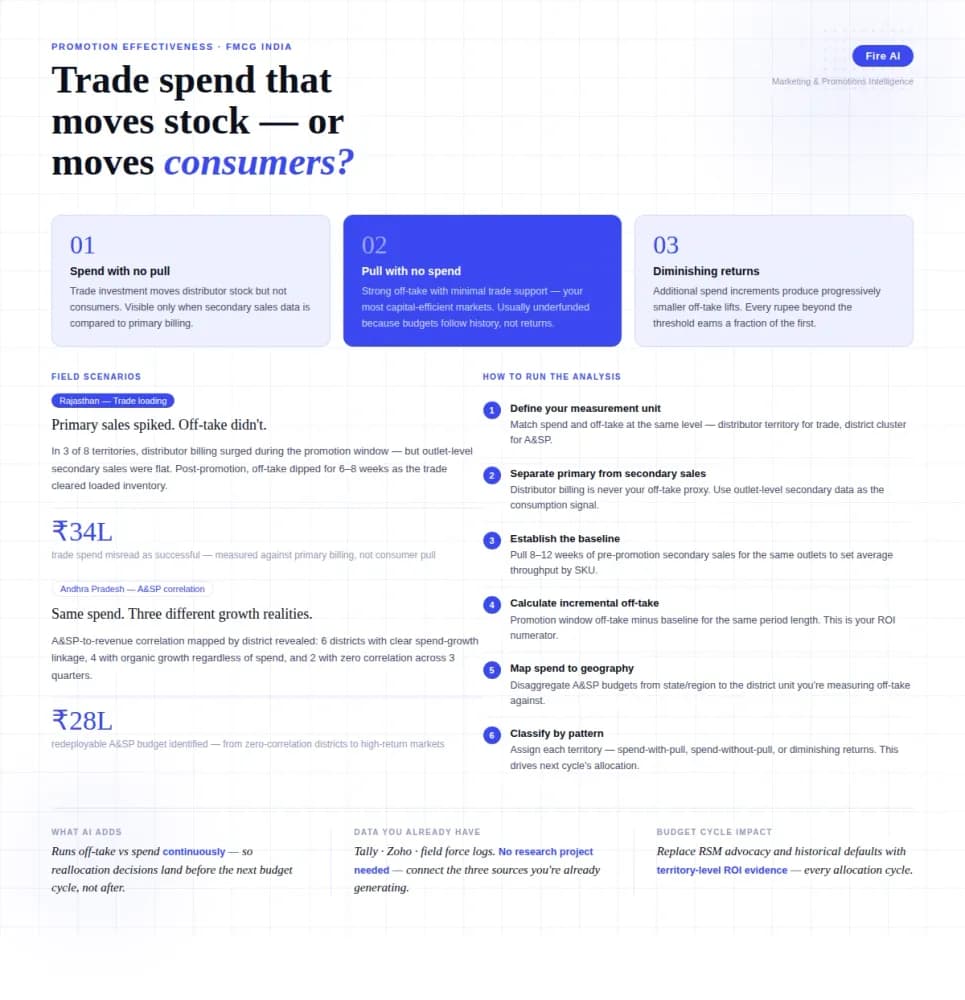
Measuring Promotion Effectiveness: A Data-Driven Guide for FMCG Marketers
FMCG brands in India spend 15–25% of gross revenue on trade promotions and A&SP (advertising and sales promotion) every year. Most can tell you how much they spent. Very few can tell you what it returned. The problem isn't a lack of data — it's that the data lives in disconnected places. Trade spend sits in finance. Off-take data lives with the distributor or field team. A&SP budgets are tracked in a marketing spreadsheet. No single view ties promotional investment to consumer pull at the outlet level. The result is a budget cycle where last year's spend allocation becomes next year's default, because no one has the numbers to argue for something different. This guide walks through how FMCG marketing and trade teams can build a promotion effectiveness framework that actually connects spend to outcome — not just channel-level assumptions.
What Is a Data Silo and Why Is It Slowing Down Your Business?
Data silos are silently costing Indian businesses time, money and decisions. Here is what they are, why they form and how to break them for good with FireAI.

Democratizing Data: How AI Analytics Levels the Playing Field for Small Businesses and Freelancers
For decades, data-driven decision making was a luxury that only enterprises could afford. Big companies hired data scientists, purchased expensive BI tools, and built complex data warehouses. In exchange, they received precise insights that guided budgets, strategy, and growth.