Quick answer
Drill-down analysis is an analytical technique that allows users to navigate from high-level summary data to progressively more detailed information by expanding hierarchical dimensions. It enables investigation of patterns, anomalies, and trends by revealing underlying details, helping analysts understand root causes and specific factors driving aggregate metrics observed at summary levels.
Drill-down analysis navigates from high-level summary data to progressively more detailed information by expanding hierarchical dimensions. It enables investigation of patterns, anomalies, and trends by revealing underlying details, helping analysts understand root causes and specific factors driving aggregate metrics.
Drill-down analysis addresses the fundamental tension between high-level overview and detailed investigation in business intelligence. By enabling fluid navigation between aggregation levels, drill-down capabilities let users start with executive dashboards and progressively explore the detailed transactions and data points that produce those summaries. This technique is essential for diagnostic analytics, which focuses on understanding why performance changes occurred.
What is Drill-Down Analysis?
Drill-down analysis is the interactive technique of moving from aggregate data to more granular levels of detail by expanding hierarchical dimensions or following relationships between datasets. This navigation pattern enables users to investigate summary metrics by examining the detailed components that comprise them, revealing patterns and causes not visible at higher levels.
The technique leverages hierarchical relationships inherent in business data, such as time hierarchies (year to quarter to month to day), geographic hierarchies (country to region to city), organizational hierarchies (company to division to department), and product hierarchies (category to subcategory to SKU). These structures provide natural pathways for progressive exploration.
Core Concepts
Granularity Levels: Different levels of detail available in dimensional hierarchies, from most aggregated to most detailed.
Interactive Navigation: User-driven exploration where each drill-down action reveals additional detail based on analytical interest.
Context Preservation: Maintaining filters and selections as users navigate to detailed levels, ensuring focused exploration.
Hierarchical Relationships: Predefined dimensional structures that determine valid drill-down paths and aggregation logic.
How Drill-Down Analysis Works
Dimensional Hierarchies
Business data organizes naturally into hierarchical structures:
Time Hierarchies: Year contains quarters, quarters contain months, months contain days. Drilling down from annual revenue to quarterly revenue reveals seasonal patterns.
Geographic Hierarchies: Country contains states or regions, which contain cities, which may contain neighborhoods or postal codes. Drilling exposes geographic performance variation.
Organizational Hierarchies: Company contains business units, which contain departments, which contain teams. Drilling identifies performance differences across organizational structure.
Product Hierarchies: Category contains subcategories, which contain product families, which contain individual SKUs. Drilling reveals which specific products drive category performance.
Customer Hierarchies: Market segments contain customer groups, which contain individual customers. Drilling identifies high-value customers within segments.
Drill-Down Operations
Expand: Reveal next level of detail while keeping parent level visible, showing how aggregate values decompose into components.
Replace: Navigate to detailed level while hiding parent level, focusing screen space on granular data.
Drill-Through: Jump to related detailed data from different sources, such as moving from summary dashboard to transactional reports.
Parameterized Navigation: Pass context from source to destination, ensuring detail pages show relevant filtered data.
Aggregation and Calculation
Drill-down requires understanding how detailed values aggregate to summary levels:
Additive Measures: Metrics like revenue, quantity, and count sum directly across dimensions. Detail values always add to parent totals.
Non-Additive Measures: Metrics like percentages, averages, and ratios require calculation at each level rather than simple summation.
Semi-Additive Measures: Metrics like inventory balances that aggregate across some dimensions but not others, such as summing across products but not time.
Complex Calculations: Business metrics may require sophisticated logic to aggregate correctly, such as profit margins recalculated at each level.
Types of Drill-Down Analysis
Hierarchical Drill-Down
Navigate predefined dimensional hierarchies:
Moving from annual sales to quarterly to monthly to daily reveals temporal patterns. Starting with national sales and drilling to regions then cities exposes geographic variation. These paths follow established business hierarchies that structure organizational thinking.
Drill-Through to Details
Navigate from aggregated data to underlying transactions:
From a dashboard showing monthly revenue trends, drill through to the actual sales transactions that comprise a specific month. This access to source data enables verification and detailed investigation when summary trends require explanation.
Drill-Across
Navigate across different fact tables or subject areas:
From sales performance metrics, drill across to inventory levels or customer satisfaction data to understand correlations. This technique connects related analytical domains to provide comprehensive context.
Parameterized Navigation
Context-aware navigation that preserves filters:
When drilling from a filtered view showing Western region sales, the detail page automatically applies the same regional filter, maintaining analytical focus without requiring users to re-establish context.
Benefits of Drill-Down Analysis
Root Cause Investigation
When summary metrics show unexpected patterns, drill-down reveals causes:
If overall revenue declines, drilling down by region may show the decrease concentrates in specific markets. Further drilling by product category identifies which product lines drive the regional decline. Additional drilling by time period reveals when the trend began.
Exception Investigation
Drill-down enables investigation of outliers and anomalies:
When summary dashboards highlight unusual values through color coding or alerts, users drill down to investigate specifics. This progressive exploration identifies whether outliers represent errors requiring correction or legitimate business situations requiring response.
Performance Attribution
Understand which components drive aggregate performance:
When overall sales exceed targets, drilling down identifies which products, regions, or customer segments contribute most to success. This attribution guides resource allocation and strategic decisions.
Flexible Exploration
Support diverse analytical questions without predefined reports:
Rather than creating separate reports for every possible analysis, drill-down enables users to follow their evolving questions through data. Starting with high-level dashboard, they progressively explore dimensions of interest.
Self-Service Analytics
Empower users to answer their own questions:
Drill-down capabilities reduce dependence on technical resources for analytical support. Business users navigate from executive dashboards to details independently, accelerating insight discovery.
Implementing Drill-Down Capabilities
Data Modeling Requirements
Effective drill-down requires proper data structure:
Dimensional Models: Star or snowflake schemas that explicitly define hierarchical relationships and aggregation paths.
Hierarchy Definitions: Metadata specifying valid drill-down paths, level names, and relationships between levels.
Surrogate Keys: Technical keys that maintain referential integrity across hierarchy levels and historical changes.
Aggregation Tables: Pre-computed summary tables at common drill levels that improve query performance without limiting drill-down flexibility.
User Interface Design
Intuitive interaction patterns that make drill-down discoverable:
Visual Indicators: Icons, underlines, or cursor changes that signal clickable drill-down opportunities.
Breadcrumb Navigation: Display current position in hierarchy with ability to return to higher levels.
Contextual Actions: Right-click or menu options that present relevant drill paths based on data selection.
Expand/Collapse Controls: Toggle symbols that indicate expandable hierarchies in tabular displays.
Performance Optimization
Maintain responsiveness as users drill to detailed levels:
Query Optimization: Efficient SQL generation that retrieves only requested hierarchy levels rather than full datasets.
Caching Strategies: Store frequently accessed drill paths to eliminate repeated database queries.
Progressive Loading: Display current level immediately while preparing next level in background.
Partition Pruning: Use hierarchy metadata to query only relevant data partitions, eliminating unnecessary data scanning.
Security Considerations
Enforce access controls throughout drill-down navigation:
Row-Level Security: Filter detailed data based on user permissions, ensuring drill-down respects access policies.
Column-Level Security: Hide sensitive attributes even in accessible records, preventing exposure through drill-down.
Hierarchy Security: Restrict drill paths based on user roles, preventing unauthorized access to certain organizational or product details.
Drill-Down vs. Related Concepts
Drill-Down vs. Roll-Up
Drill-Down: Navigate from summary to detail, revealing increasingly granular data.
Roll-Up: Navigate from detail to summary, aggregating granular data into higher-level views.
These are complementary operations enabling bidirectional navigation through dimensional hierarchies.
Drill-Down vs. Drill-Through
Drill-Down: Navigate within same dataset or fact table to lower hierarchy levels.
Drill-Through: Jump to related but different datasets, often moving from analytical dashboard to operational reports.
Drill-Down vs. Slice and Dice
Drill-Down: Vertical navigation through hierarchy levels.
Slice: Filter data to focus on specific dimension values at current level.
Dice: Subset data across multiple dimensions simultaneously.
These techniques work together in comprehensive analytical interfaces.
Best Practices for Drill-Down Analysis
Design Intuitive Hierarchies
Create drill paths that match business thinking:
Hierarchies should reflect how users conceptualize the business. If salespeople think regionally first then by product, design drill paths that follow this mental model rather than imposing technical structures.
Maintain Context
Preserve filters and selections during navigation:
When users drill from filtered views, maintain those filters in detailed displays unless explicitly cleared. This context preservation enables focused exploration without repetitive filter reapplication.
Provide Multiple Drill Paths
Support different analytical approaches:
Enable drilling by time, geography, product, and customer from the same starting point. Different questions require different exploration paths, and flexibility increases analytical value.
Optimize Performance
Ensure responsive interaction at all levels:
Slow drill-down responses discourage exploration. Implement caching, aggregation tables, and query optimization to maintain sub-second response times throughout hierarchies.
Include Breadcrumb Navigation
Show current position and enable easy return:
Display drill path clearly with clickable breadcrumbs that let users return to higher levels without starting over. This navigation support encourages exploration by reducing perceived cost of drilling down.
Drill-Down in Modern Analytics
Cloud BI Platforms
Modern business intelligence tools provide sophisticated drill-down capabilities:
Platforms like Tableau, Power BI, Looker, and Qlik embed drill-down interactions directly in visualizations. Users click chart elements to reveal underlying detail without switching contexts or opening separate reports.
OLAP Databases
Specialized analytical databases optimize drill-down performance:
Multidimensional OLAP cubes pre-aggregate data at multiple hierarchy levels, enabling instantaneous drill-down response. These structures trade some flexibility for dramatic performance improvements.
Real-Time Analytics
Drill-down extends to streaming data:
Modern architectures enable drill-down on real-time data, allowing users to investigate current operational metrics with the same progressive exploration used for historical analysis.
Mobile Analytics
Drill-down adapts to mobile form factors:
Touch-optimized interfaces support drill-down through gestures and progressive disclosure patterns suited to smaller screens, maintaining analytical capability on mobile devices.
The Future of Drill-Down Analysis
AI-Guided Exploration
Machine learning will suggest relevant drill paths:
Rather than requiring users to manually explore every dimension, AI systems will identify unusual patterns and recommend specific drill-down paths likely to reveal insights. Automated anomaly detection triggers contextual drill-down suggestions.
Natural Language Navigation
Conversational interfaces will enable drill-down through questions:
Users will drill down by asking follow-up questions in natural language: "Why did Western region revenue decline?" automatically drills to regional, product, and temporal details most relevant to answering the question.
Automated Root Cause Analysis
Systems will automatically traverse drill paths to identify causes:
When metrics deviate from expected patterns, automated analysis will drill through hierarchies to identify specific contributors, presenting findings directly rather than requiring manual exploration.
Seamless Cross-System Drill
Unified data architectures will enable drill-down across platform boundaries:
Users will drill from cloud BI dashboards directly into operational systems, from high-level analytics to detailed CRM records or ERP transactions, without encountering technical barriers.
Drill-down analysis remains essential to interactive business intelligence, bridging the gap between executive overview and operational detail. As analytical tools become more sophisticated, drill-down capabilities evolve from manual navigation to intelligent exploration guided by AI and natural language interaction.
Platforms like FireAI enhance drill-down analysis by enabling users to ask progressively detailed questions in natural language, automatically generating queries that navigate hierarchies without requiring users to understand underlying dimensional structures or drill-down mechanics.
Ready to act on your data?
See how teams use FireAI to ask in plain language and get analytics they can trust.
Explore FireAI workflows
Go from this topic into product features and solution paths that match what you read here.
Topic hub
BI Fundamentals
Foundational guides on business intelligence, analytics architecture, self-service BI, and core data concepts.
Explore hubFrequently asked questions
Related in this topic
What Is Diagnostic Analytics? Definition and Examples
Diagnostic analytics explains why metrics changed—not just what happened. Learn the definition, techniques, real business examples, and how diagnostic workflows work in modern BI.
What is Real-Time Analytics? Definition and Examples
Real-time analytics delivers instant insights from live data streams—no waiting for batch processing. Discover how businesses use real-time analytics for fraud detection, monitoring, and immediate decision-making with examples.
What is FireAI? AI-Powered BI Platform Overview
FireAI is a unified AI analytics platform with 250+ data connectors that transforms complex data into actionable insights. Learn about FireAI features, natural language queries, multi-source integration, and how it enables data analysis without SQL.
What is Data Democratization? Benefits and Challenges
Data democratization enables all employees to access and analyze business data without technical barriers. Learn how data democratization works, which benefits it provides, and how to implement it to transform organizations into data-driven cultures.
From the blog

What Is a Data Silo and Why Is It Slowing Down Your Business?
Data silos are silently costing Indian businesses time, money and decisions. Here is what they are, why they form and how to break them for good with FireAI.

Democratizing Data: How AI Analytics Levels the Playing Field for Small Businesses and Freelancers
For decades, data-driven decision making was a luxury that only enterprises could afford. Big companies hired data scientists, purchased expensive BI tools, and built complex data warehouses. In exchange, they received precise insights that guided budgets, strategy, and growth.
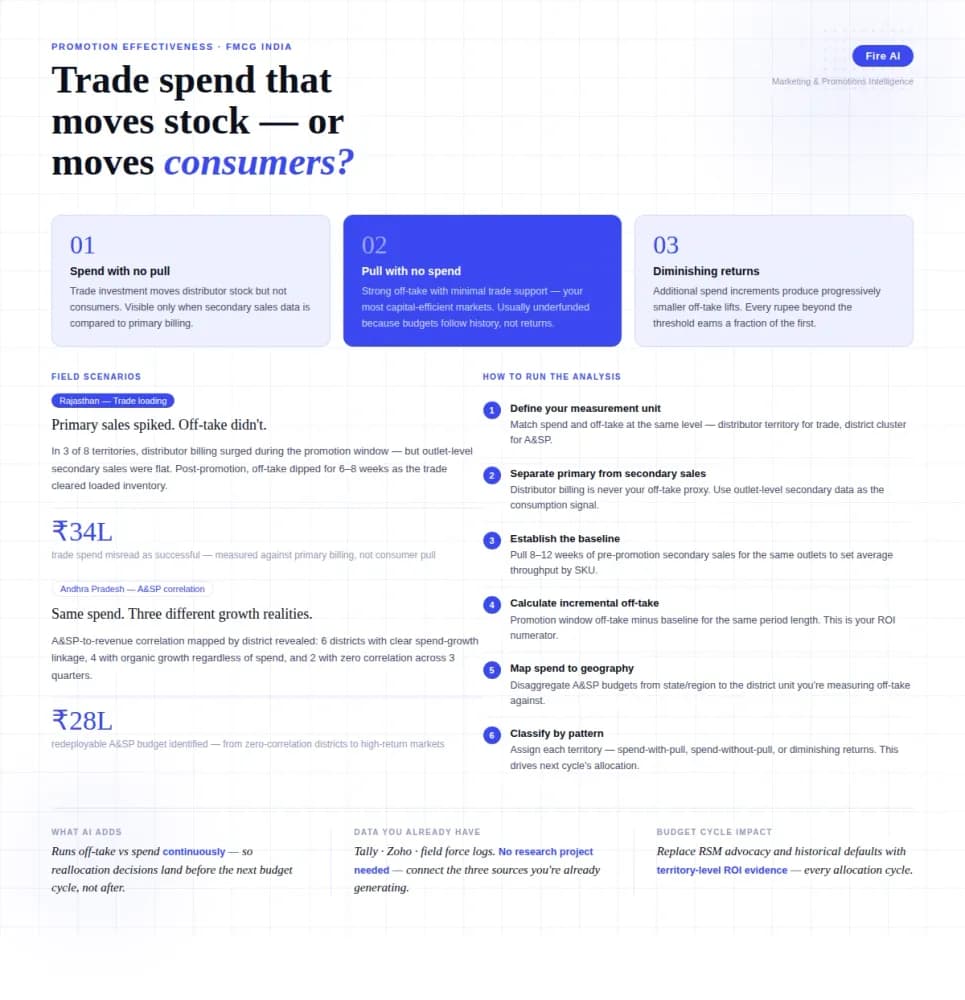
Measuring Promotion Effectiveness: A Data-Driven Guide for FMCG Marketers
FMCG brands in India spend 15–25% of gross revenue on trade promotions and A&SP (advertising and sales promotion) every year. Most can tell you how much they spent. Very few can tell you what it returned. The problem isn't a lack of data — it's that the data lives in disconnected places. Trade spend sits in finance. Off-take data lives with the distributor or field team. A&SP budgets are tracked in a marketing spreadsheet. No single view ties promotional investment to consumer pull at the outlet level. The result is a budget cycle where last year's spend allocation becomes next year's default, because no one has the numbers to argue for something different. This guide walks through how FMCG marketing and trade teams can build a promotion effectiveness framework that actually connects spend to outcome — not just channel-level assumptions.