Quick answer
Excel excels at simple calculations and familiar spreadsheet workflows for individual users, while BI tools provide advanced data visualization, real-time analytics, and collaborative dashboards for team-based business analysis. Choose Excel for basic analysis, BI tools for comprehensive organizational insights.
Excel excels at simple calculations and familiar spreadsheet workflows for individual users, while BI tools provide advanced data visualization, real-time analytics, and collaborative dashboards for team-based business analysis. Choose Excel for basic analysis, business intelligence tools for comprehensive organizational insights.
Business analysis tools have evolved from familiar spreadsheet applications to sophisticated business intelligence platforms, creating choices between Excel's accessibility and BI tools' advanced capabilities. Excel and BI tools represent different approaches to data analysis, each with strengths that may better serve different analytical needs and organizational requirements. Understanding these differences helps organizations select the appropriate tool for their analytical challenges and business objectives.
Excel vs BI Tools for Business Analysis
The choice between Excel and business intelligence tools represents a fundamental decision in how organizations approach data analysis and business intelligence. While Excel offers familiar spreadsheet functionality and accessibility, BI tools provide advanced analytical capabilities, data visualization, and collaborative features designed for modern business analysis. Each approach serves different analytical needs and organizational maturity levels.
Data Handling and Management
Data management capabilities form the foundation of analytical effectiveness.
Excel Data Handling:
- Familiar spreadsheet interface with cells, rows, and columns
- Manual data entry and manipulation capabilities
- Limited data volume handling (typically under 1 million rows)
- File-based data storage with version control challenges
- Basic data validation and error checking features
BI Tools Data Handling:
- Advanced data integration from multiple sources
- Automated data refresh and real-time updates
- Support for large datasets and big data processing
- Centralized data management with governance controls
- Automated data cleansing and transformation capabilities
Analytical Capabilities and Functions
Analytical power and computational capabilities vary significantly between tools.
Excel Analytical Features:
- Comprehensive formula library with 400+ functions
- Pivot tables and charts for data summarization
- What-if analysis and scenario planning tools
- Statistical analysis and regression capabilities
- Custom macro development with VBA programming
BI Tools Analytical Features:
- Advanced statistical analysis and predictive modeling
- Machine learning and AI-powered insights
- Real-time analytics and streaming data processing
- Complex calculations with drag-and-drop interfaces
- Automated anomaly detection and trend analysis
Data Visualization and Reporting
Visualization capabilities determine how effectively insights are communicated.
Excel Visualization:
- Standard charts and graphs (bar, line, pie, etc.)
- Pivot charts and sparklines for data representation
- Conditional formatting for data highlighting
- Custom dashboard creation with shapes and images
- Basic interactive elements through form controls
BI Tools Visualization:
- Advanced visualization libraries with 18+ chart types
- Interactive dashboards with drill-down capabilities
- Custom visualization development and extensions
- Real-time data visualization and streaming charts
- Automated insight generation and narrative reporting
Collaboration and Sharing
Team collaboration features impact organizational analytical effectiveness.
Excel Collaboration:
- File sharing through email, network drives, or cloud storage
- Basic commenting and tracking changes features
- Limited real-time collaboration in shared workbooks
- Version control challenges with multiple editors
- Manual consolidation of individual analyses
BI Tools Collaboration:
- Real-time collaborative dashboard editing
- Role-based access controls and permissions
- Centralized content management and sharing
- Integrated commenting and discussion features
- Automated report distribution and scheduling
Scalability and Performance
Performance and scalability determine tool effectiveness as organizations grow.
Excel Scalability:
- Performance degradation with large datasets
- Single-user focus with limited concurrent access
- Manual scaling through file splitting and consolidation
- Resource constraints on individual computers
- Limited automation for repetitive tasks
BI Tools Scalability:
- Enterprise-grade scalability for large organizations
- Support for thousands of concurrent users
- Cloud-based elastic scaling capabilities
- Automated performance optimization and caching
- Distributed processing for complex analytical workloads
Data Security and Governance
Security and governance approaches affect enterprise adoption and compliance.
Excel Security:
- File-level security through passwords and encryption
- Network share permissions for access control
- Basic audit trails through version history
- Manual governance through organizational policies
- Limited compliance automation and reporting
BI Tools Security:
- Enterprise security frameworks with SSO integration
- Row-level security and data masking capabilities
- Comprehensive audit logging and compliance reporting
- Automated data governance and quality controls
- Integration with enterprise identity management systems
Learning Curve and User Adoption
Ease of learning and adoption impacts organizational analytical maturity.
Excel Learning Curve:
- Familiar interface for users with spreadsheet experience
- Extensive online resources and training materials
- Intuitive for basic data manipulation tasks
- Progressive learning from simple to advanced features
- Universal availability across organizations
BI Tools Learning Curve:
- Specialized training often required for effective use
- Intuitive drag-and-drop interfaces reduce technical barriers
- Self-service capabilities for business user adoption
- Comprehensive documentation and learning resources
- Role-specific training for different user types
Cost Structure and Investment
Cost considerations influence tool selection and organizational investment.
Excel Cost Structure:
- Included in Microsoft Office suite licensing
- Low or no additional cost for basic functionality
- Free alternatives available (Google Sheets, OpenOffice)
- Minimal infrastructure requirements
- Training costs for advanced features only
BI Tools Cost Structure:
- Subscription-based pricing models
- Tiered licensing based on features and users
- Additional costs for advanced capabilities
- Infrastructure and maintenance expenses
- Implementation and training investments
Automation and Efficiency
Automation capabilities determine analytical productivity and efficiency.
Excel Automation:
- Macro recording and VBA programming for automation
- Template-based report generation
- Manual process automation through formulas
- Limited workflow automation capabilities
- Custom automation development required
BI Tools Automation:
- Automated data refresh and report generation
- Scheduled analytics and alerting systems
- Workflow automation and process integration
- AI-powered automation and insight generation
- Pre-built automation templates and workflows
Integration and Connectivity
Integration capabilities affect tool utility within existing technology ecosystems.
Excel Integration:
- Basic connectivity through data import/export
- API integration capabilities through VBA
- Manual data synchronization processes
- Limited real-time data connectivity
- File-based integration with other systems
BI Tools Integration:
- Comprehensive API and connector libraries
- Real-time data integration and streaming
- Pre-built integrations with popular business applications
- Enterprise system integration (ERP, CRM, databases)
- Automated data pipelines and ETL processes
Mobile and Remote Access
Mobile capabilities support modern work patterns and remote analysis.
Excel Mobile Access:
- Mobile apps for iOS and Android platforms
- Cloud storage integration for file access
- Basic editing capabilities on mobile devices
- Limited advanced functionality on mobile platforms
- Offline viewing with manual synchronization
BI Tools Mobile Access:
- Native mobile applications optimized for touch interfaces
- Responsive web interfaces for any device
- Real-time mobile dashboards and alerts
- Offline capabilities for critical business metrics
- Mobile-optimized interactive visualizations
Use Case Suitability
Different analytical scenarios favor different tool capabilities.
Best for Excel:
- Individual user analysis and reporting
- Simple calculations and data manipulation
- Ad-hoc analysis and one-off reports
- Familiar spreadsheet workflows and processes
- Small-scale data analysis and prototyping
Best for BI Tools:
- Team-based analytical collaboration
- Complex data visualization and dashboard creation
- Real-time monitoring and alerting
- Enterprise-wide reporting and analytics
- Advanced analytical modeling and forecasting
Tool Comparison Table
| Aspect | Excel | BI Tools |
|---|---|---|
| Data Handling | Manual, file-based | Automated, integrated |
| Analytics Power | Formula-based calculations | Advanced statistical modeling |
| Visualization | Basic charts and graphs | Interactive dashboards |
| Collaboration | File sharing and comments | Real-time co-editing |
| Scalability | Limited by file size | Enterprise-grade scaling |
| Security | File-level protection | Enterprise security frameworks |
| Learning Curve | Familiar interface | Specialized training |
| Cost | Low, included in Office | Subscription-based |
| Automation | Manual macros and VBA | Built-in automation |
| Integration | Manual data import/export | Comprehensive APIs |
Migration Strategies and Best Practices
Organizations often need to transition between tools based on evolving needs.
Excel to BI Tools Migration:
- Start with familiar spreadsheet-like interfaces
- Gradual transition through hybrid approaches
- Data migration and cleansing processes
- User training focused on new capabilities
- Change management and adoption support
Complementary Usage:
- Excel for data preparation and initial analysis
- BI tools for advanced visualization and sharing
- Excel as a data source for BI platforms
- Combined workflows leveraging both tools
- Excel add-ins for BI tool connectivity
Future Evolution and Trends
Tool evolution impacts long-term analytical capabilities and investment decisions.
Excel Evolution:
- Enhanced AI capabilities through Copilot integration
- Improved collaboration features and cloud connectivity
- Advanced analytical functions and automation
- Integration with Power BI and other Microsoft tools
- Continued focus on accessibility and familiarity
BI Tools Evolution:
- Enhanced AI and machine learning integration
- Improved natural language and conversational interfaces
- Advanced automation and low-code development
- Integration with emerging technologies (IoT, streaming data)
- Focus on user experience and accessibility improvements
Decision Framework for Organizations
Organizations should evaluate tools based on comprehensive analytical requirements.
Business and User Factors:
- Team size and analytical user base
- Current technical skills and training budget
- Analytical complexity and sophistication needs
- Collaboration and sharing requirements
- Budget constraints and cost sensitivity
Technical and Analytical Requirements:
- Data volume and complexity requirements
- Real-time analytics and alerting needs
- Integration requirements with existing systems
- Mobile and remote access requirements
- Future scalability and growth needs
Organizational Maturity Factors:
- Current analytical maturity and data culture
- IT infrastructure and technical capabilities
- Change management and user adoption readiness
- Regulatory compliance and governance requirements
- Long-term technology strategy and roadmap
The choice between Excel and business intelligence tools depends on an organization's analytical requirements, user capabilities, and business objectives. Excel provides familiar, accessible functionality for basic analysis and individual users, while BI tools offer advanced capabilities for collaborative, enterprise-wide business intelligence.
FireAI bridges the gap between Excel's accessibility and BI tools' advanced capabilities by providing conversational analytics that make complex data analysis accessible through natural language queries. Users can ask business questions conversationally and receive instant insights, combining the familiarity of Excel with the power of modern BI platforms.
Organizations should consider their specific analytical needs when selecting between Excel and BI tools, often using Excel for initial analysis and BI tools for advanced, collaborative, and enterprise-wide business intelligence. The optimal approach balances familiarity with analytical power, ensuring users have the right tools for their analytical challenges.
Ready to act on your data?
See how teams use FireAI to ask in plain language and get analytics they can trust.
Explore FireAI workflows
Go from this topic into product features and solution paths that match what you read here.
Topic hub
BI Fundamentals
Foundational guides on business intelligence, analytics architecture, self-service BI, and core data concepts.
Explore hubFrequently asked questions
Related in this topic
Cloud BI vs On-Premise BI: Key Differences
Compare cloud BI vs on-premise BI on pricing, security, control, and total cost. See pros and cons for Indian businesses choosing a deployment model.
Self-Service BI vs Traditional BI: Key Differences
Compare self-service BI vs traditional BI on speed, governance, and who builds reports. Learn which model fits your team's skills, size, and data culture.
Best No-Code Data Analysis Tools in India (2026)
Compare the best no-code data analysis tools in 2026 — platforms that let business users analyse data without SQL or programming. Find the right no-code analytics tool for your Indian business.
Should I Switch from Excel to BI Tools? Decision Guide
Decide whether to switch from Excel to BI tools. Learn about migration factors, benefits, challenges, and when business intelligence tools are worth the investment for your organization.
From the blog

How a Modern Analytics Platform Transforms Business Intelligence
Why faster decision-making, real-time analytics, and AI-driven intelligence separate market leaders from laggards—and how Fire AI closes the gap between data and action.

Democratizing Data: How AI Analytics Levels the Playing Field for Small Businesses and Freelancers
For decades, data-driven decision making was a luxury that only enterprises could afford. Big companies hired data scientists, purchased expensive BI tools, and built complex data warehouses. In exchange, they received precise insights that guided budgets, strategy, and growth.
Measuring Promotion Effectiveness: A Data-Driven Guide for FMCG Marketers
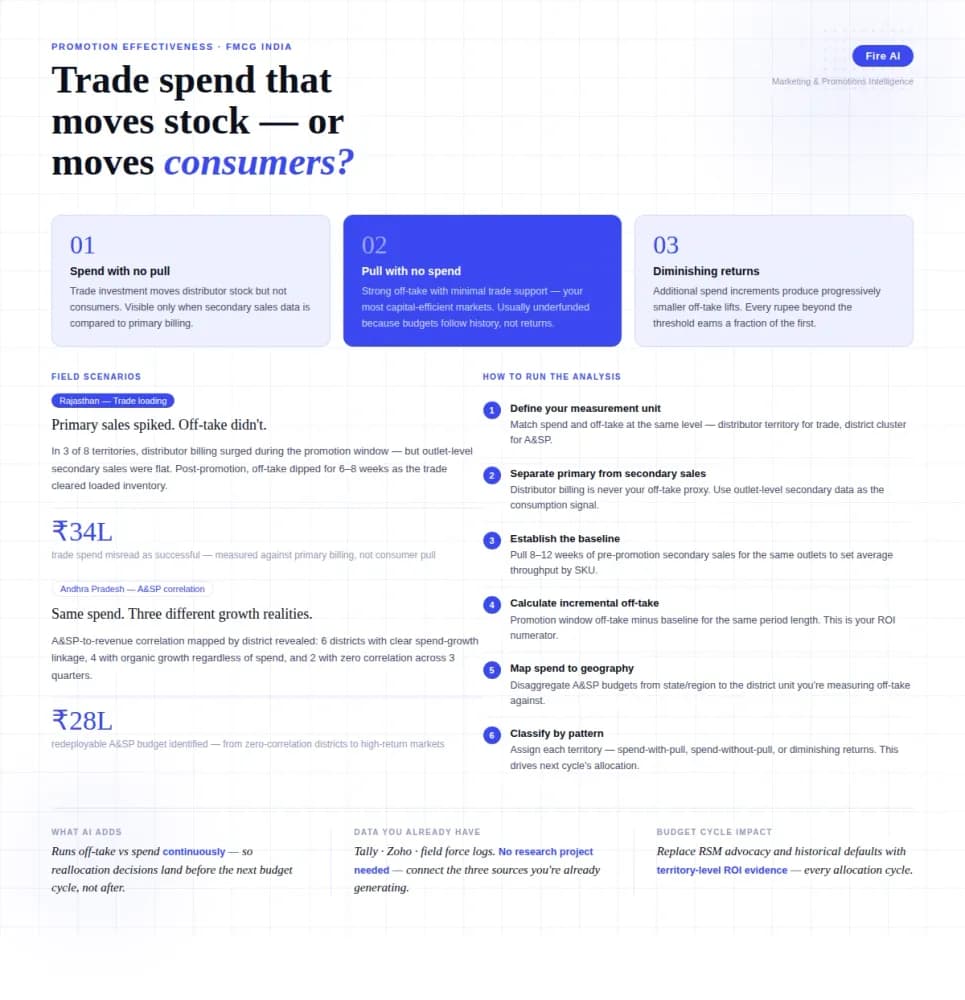
FMCG brands in India spend 15–25% of gross revenue on trade promotions and A&SP (advertising and sales promotion) every year. Most can tell you how much they spent. Very few can tell you what it returned. The problem isn't a lack of data — it's that the data lives in disconnected places. Trade spend sits in finance. Off-take data lives with the distributor or field team. A&SP budgets are tracked in a marketing spreadsheet. No single view ties promotional investment to consumer pull at the outlet level. The result is a budget cycle where last year's spend allocation becomes next year's default, because no one has the numbers to argue for something different. This guide walks through how FMCG marketing and trade teams can build a promotion effectiveness framework that actually connects spend to outcome — not just channel-level assumptions.